Spotlight: eBay Bundle discounts
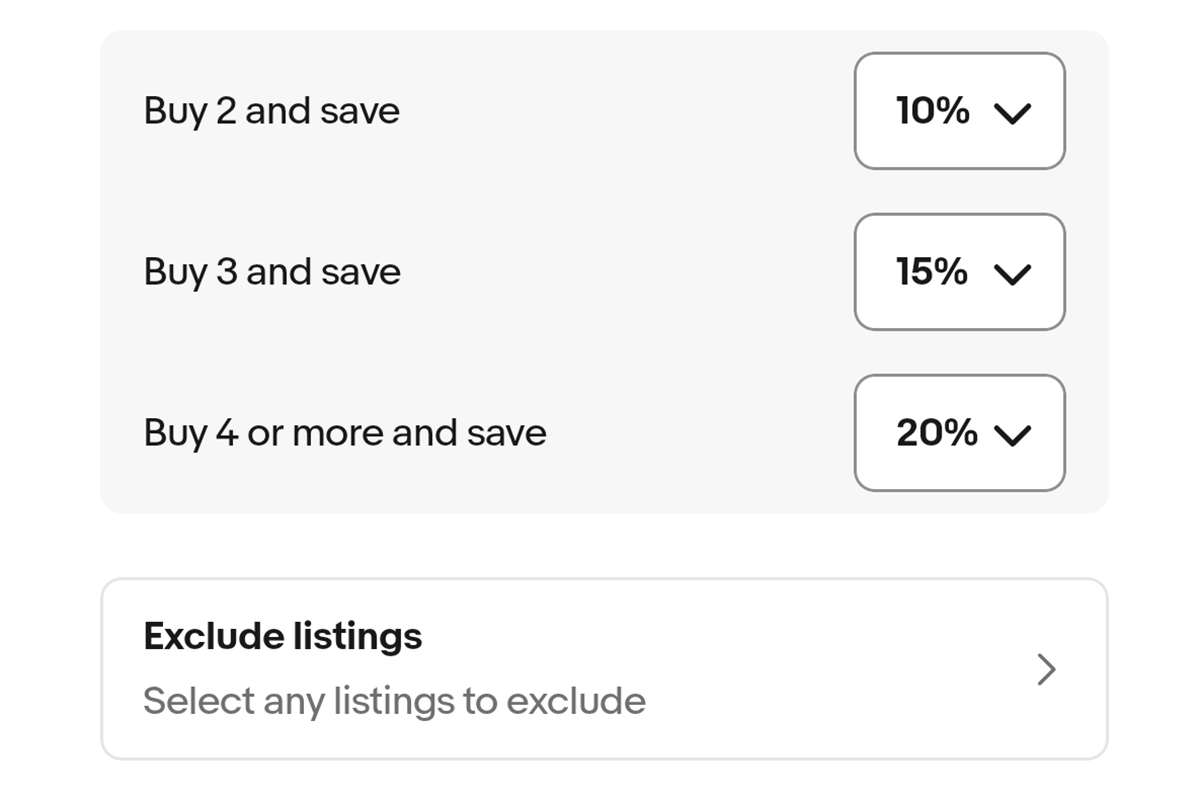
eBay launched Bundle Discounts, letting sellers set tiered percentage-off deals (2, 3, or 4+ items) visible at listing and checkout. Returns trigger automatic discount recalculation — sellers don't control refund amounts when partial returns drop a buyer below a bundle threshold.
eBay is matching Amazon's multi-unit and bundle mechanics to drive basket size, but the automatic refund recalculation shifts financial risk to sellers — a pattern of margin compression through platform-automated buyer-friendly policies.
The automatic refund recalculation on partial returns is the hidden risk — sellers on tight margins could see higher-than-expected refund totals if buyers game bundle thresholds. eBay sellers should model their bundle discount tiers against their lowest-margin SKUs before enabling site-wide opt-in.
Operational Impact
This story may require teams to revisit workflows, monitoring, or platform assumptions.
Bottom Line
eBay bundle discounts auto-enroll new listings — partial returns recalculate refunds without seller approval.
Source Lens
Industry Context
Useful background context, but lower-priority than direct platform, community, or operator intelligence.
Impact Level
medium
eBay bundle discounts auto-enroll new listings — partial returns recalculate refunds without seller approval.
Key Stat / Trigger
30% off for 3-item bundles as maximum illustrated discount tier
Focus on the operational implication, not just the headline.
Full Coverage
When you’re browsing an eBay listing or a seller’s shop or profile, you’ll see prompts from the seller where bundle discounts are on offer. These will typically tell you the discounts that apply if you buy 2, 3 or more items together or the bundle discounts available if you buy different items together.
In the details of each bundle discount, you’ll see the percentage off based on the number of items you buy, so you’ll know exactly the deal you’re getting before you go to checkout. You can either add extra items while browsing or at checkout. The savings are applied automatically and are clearly visible before you pay.
Bundle discounts apply to item prices only. Postage and handling are calculated separately and are based on the seller’s postage policy. Bundle discounts can be combined with eBay sitewide promotions and sale events. They can’t be combined with seller vouchers, seller order discounts, volume pricing, or other seller promotional codes you may be running.
If an item is eligible for multiple seller discounts (e. g. a bundle discount and a voucher) the discount that is the best deal for the buyer will be applied. Example: if a seller is offering a bundle discount of 15% for 2 items and a voucher for 20% off, the voucher discount will apply, not the bundle discount.
eBay Bundle discounts for sellers The decision on which items are included or excluded from bundle discounts is entirely up to you. When you set up the bundle discount feature, buyers see the discounts you offer while browsing a listing and in your shop or profile. The bundle discount prompts will show the percentage discounts you offer.
The cash amount the buyer pays will be clear at checkout. You don’t need to do anything to calculate the discount or confirm it’s applied. Setting up bundle discounts There are a number of ways to turn on bundle discounts and set up simple rules for the discounts you offer, the items you’re including, and items you wish to exclude.
To add bundle discounts on the eBay app: Sign into the eBay app. Tap the Selling page and then the Bundles icon. From there, choose your discount percentage for 2, 3, and 4+ items and select which listings are included. You can also access bundle discounts through My eBay: Go to your Account page. Select Selling. Select Bundle discounts.
From there, choose your discount percentage for 2, 3, and 4+ items and select which listings are included. And you can access bundle discounts from your Seller Hub: Go to Seller Hub. Select Active listings. In the Actions menu, select Add or Review Discounts.
From there, choose your discount percentage for 2, 3, and 4+ items and select which listings are included. NB If you are opted in to bundle discounts, any new eligible listings you create will automatically be added to your bundle discount inventory. You can exclude individual listings at any time if you don’t want them to be eligible for bundle discounts.
How do returns work with eBay Bundle discounts? If a buyer returns part of an order that qualified for a bundle discount, eBay recalculate the price based on the items they keep. Example You offer bundle discounts as follows: Buy 2 items, get 20% off Buy 3 items, get 30% off StepWhat happensAmount1. Items purchasedBuyer purchases 3 items at £10 each£30. 002.
Bundle discount applied3-item bundle discount is 30% off (£3 off each item)Buyer pays £21. 00 (£7 each)3. Buyer returns 1 itemBuyer keep 2 items—4. Bundle discount is recalculatedSince the buyer now keeps 2 items, the order qualifies for the 2-item bundle discount instead2 items = £16. 00 (£8 each)5. Refund is calculatedOriginal payment (£21.
00) − New total for the 2 items kept (£16. 00)Refund = £5. 00 Why isn’t the refund £7? The buyer no longer qualifies for the 3-item discount after returning an item. Their order is recalculated using the discount that applies to the 2 items they keep. eBay calculates this refund automatically. You don’t need to review or approve the calculation.
In Seller Hub > Active Listings > Actions > Add or Review Discounts, exclude any low-margin or high-return-rate SKUs before enabling bundles to prevent margin bleed.
Audit your return rate by SKU in Seller Hub within the next 30 days — items above 10% return rate are bundle discount liabilities and should be explicitly excluded.
Original Source
This briefing is based on reporting from Tamebay. Use the original post for full primary-source context.
Style
Audience