NameQuick AI File renamer for Windows/Mac
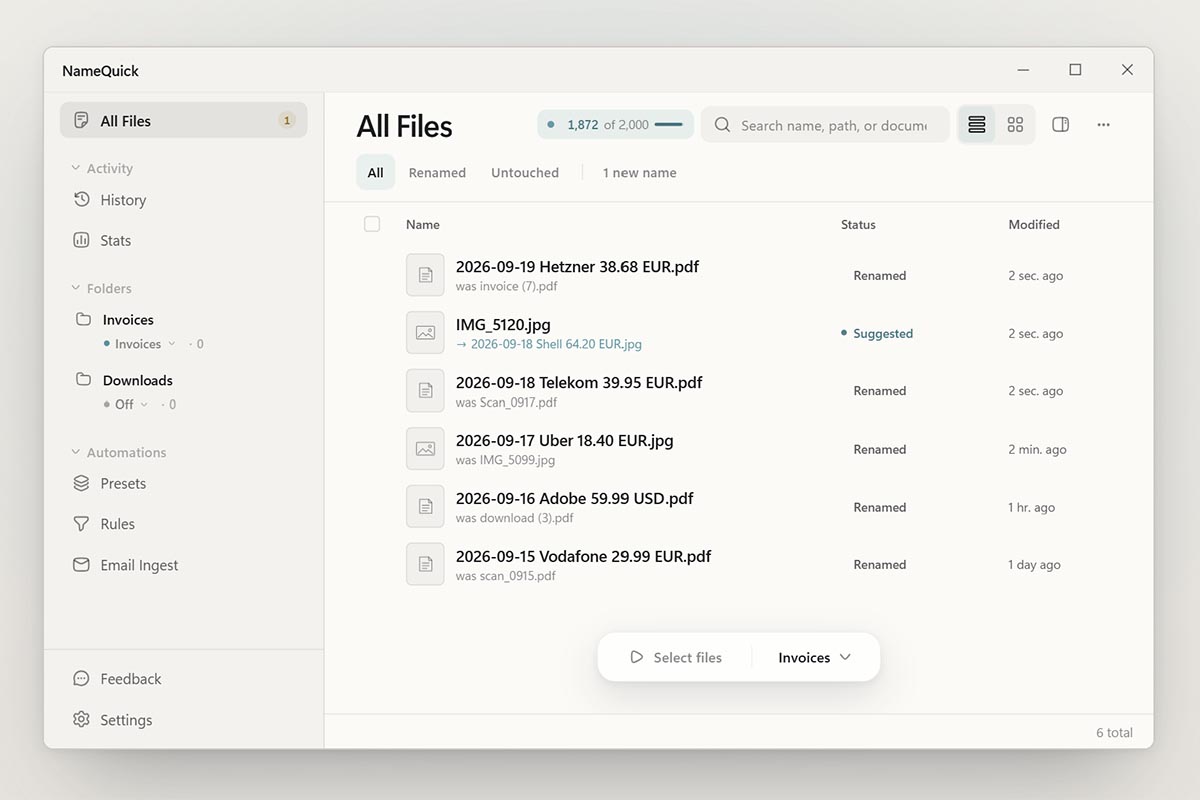
We have always loved a quick utility that does what it says on the tin and NameQuick certainly appears to do just that. Ecommerce generates 1000s of files each year, and none of them are named appropriately and that’s the problem that NameQuick solves. NameQuick reads each file and names it by what’s inside: date, […]
Source Lens
Industry Context
Useful background context, but lower-priority than direct platform, community, or operator intelligence.
Impact Level
medium
Use this briefing to decide whether your team needs an immediate workflow, policy, or reporting change.
Key Stat / Trigger
No single quantitative trigger surfaced in this report.
Focus on the operational implication, not just the headline.
Full Coverage
We have always loved a quick utility that does what it says on the tin and NameQuick certainly appears to do just that. Ecommerce generates 1000s of files each year, and none of them are named appropriately and that’s the problem that NameQuick solves. NameQuick reads each file and names it by what’s inside: date, vendor, amount.
It watches your folders and renames new files as they arrive, or holds every name for your approval. It aims to write the name that you would have typed yourself! What’s really cute is that it doesn’t really care what format your file is in.
If for instance you have a purchase order file for invoices and receipts, regardless whether it’s a PDF invoice from a supplier or a jpg photo of a petrol receipt, it’ll rename them all into DATE-SUPPLIER-INVOICE/RECIEPT/PRICE format so that when you’re hunting for a document it’s easily found.
You can run NameQuick in automatic mode and let it rename files as they arrive, or in review mode where you can manually check renames before they’re approved. And it won’t guess – if it’s not certain it can rename a file it’ll wait for you to fill in the missing details so that you know it’s correct.
Plus the old name is retained as history so if you ever want to go back then you can. NameQuick only works on the files and folders you select and nothing else changes – the file date and folders remain untouched. I’ve noticed that my most active users are businesses that buy and sell products.
Every order leaves an invoice, a delivery note and a spec sheet, and the files pile up. One lighting shop has renamed more than 3,000 files.
– Josef Moucachen, NameQuick You can purchase NameQuick on a monthly subscription or with Rename Packs buy a bundle of renames with no subscription that are valid for one year – ideal if you’ve got one off projects rather than wanting an ongoing service. You can even use your own AI subscription and just pay a one off licence fee.
And if you’d like a three month trial, the code enter the code CHANNELX at checkout on the 500-renames monthly plan (the first 100 readers, until 31 January 2027). After the three months it’s $12 a month, and you can cancel any time.
Original Source
This briefing is based on reporting from Tamebay. Use the original post for full primary-source context.
Style
Audience
Get fee and policy changes before they hit your margin
The free Daily Marketplace Brief flags fee and policy changes across Amazon, Walmart, TikTok Shop, eBay and Etsy, with the source document.