

How to Never Run Out of Stock on Amazon
EcomCrew published a comprehensive guide on preventing Amazon stockouts through proper inventory management, focusing on Seller Central replenishment alerts and reorder point calculations. The article emphasizes that over 82% of Amazon sellers use FBA but many lose money due to poor stock management.
The updated Seller Central navigation path for replenishment alerts is crucial since many sellers still use outdated instructions. Calculate your true total lead time including all logistics steps - most sellers underestimate this by 30-50%, leading to stockouts despite having alerts.
As Amazon's algorithm increasingly punishes stockouts with ranking drops, inventory management becomes a competitive advantage that directly impacts long-term market share and customer retention.
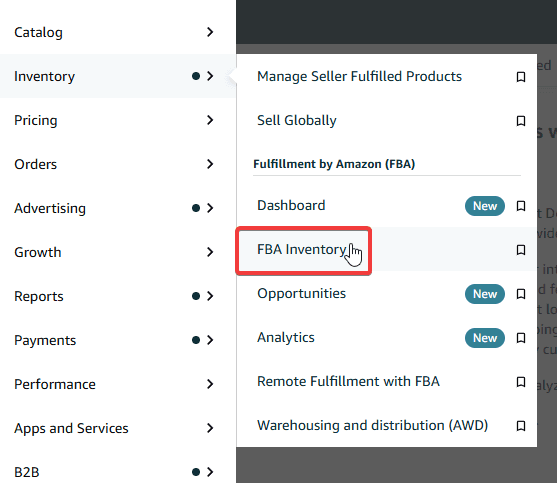
Set up replenishment alerts in Seller Central: Inventory > FBA Inventory > Select SKUs > Set Replenishment Alerts to get red bell warnings before stockouts.
Calculate reorder point using: (Average Daily Sales x Total Lead Time in Days) + Safety Stock, including all logistics delays from supplier to Amazon availability.
Bottom Line
Proper Amazon inventory management prevents ranking drops and competitor customer theft.
Source Lens
Operator Tactics
Tactical content that tends to be strongest when tied to workflow, process, or execution.
Impact Level
medium
Proper Amazon inventory management prevents ranking drops and competitor customer theft.
Key Stat / Trigger
82% of Amazon sellers use FBA
Focus on the operational implication, not just the headline.
Full Coverage
Running out of stock on Amazon is one of the fastest ways to lose momentum you spent months building. Your listing drops in search rankings, the Buy Box disappears, and customers who would have bought from you end up buying from a competitor. The worst part? Once they find a replacement, they often do not come back.
More than 82% of Amazon sellers use FBA, yet many lose money because they do not manage their stock properly. The good news is that preventing stockouts does not require a complicated system. It requires the right habits and the right tools, set up correctly from the start. This guide shows you how to never run out of stock on Amazon.
Why Stockouts Are More Damaging Than You Think Most sellers focus on the obvious loss: the sales they did not make while their product was unavailable. That is real, but it is only part of the problem. Stockouts lead to lost sales and lower your product's ranking in Amazon's search results.
When customers cannot find your product in stock, they turn to competitors. Inventory issues such as consistent stockouts also negatively impact your account health and your eligibility for programs like Amazon Prime and the Buy Box.
When your listing goes out of stock, you lose momentum, experience weaker reorder velocity, and face extra fees from rushed shipments. You end up paying more to fix a problem that was preventable. There is also a financial side people underestimate. Stockouts lead to lost sales, lower rankings, and negative customer experiences.
Overstocking, on the other hand, causes high storage fees and unsold inventory, tying up resources unnecessarily. You are trying to thread a needle. Too little stock and you miss sales. Too much and you pay for the privilege of doing so.
Step 1: Set Up Replenishment Alerts in Seller Central The fastest thing you do today to protect your inventory is set up replenishment alerts in Seller Central. This takes less than two minutes per listing, and it acts as your early warning system before a stockout happens. The navigation inside Seller Central has been updated.
Here is the current path to set up alerts: Click the menu icon on the left sidebar, select Inventory, then click “FBA Inventory.” Apply a filter in the Fulfillment section and select “Amazon” to show only your FBA listings. Check the boxes next to the SKUs you want to monitor. Click “Select group action,” then choose “Set Replenishment Alerts.”
You'll be taken to a new page where you can set, edit and delete replenishment alerts for your items.
Choose your alert trigger: “When fulfillable quantity reaches (Units)” if you want to be notified whenever your quantity reaches a set number, or “When Weeks-of-Cover reaches (Weeks)” if you want to account for how many weeks it would take for the product to reach Amazon's fulfillment center. Click Save.
The gold bell indicates that alerts are set up for that listing but the alert threshold has not been reached. The red bell indicates when your alert threshold for that product has been reached. That red bell is your signal to act.
When deciding on your alert quantity for each product, consider your average sales and the lead time required to order and ship stock to a fulfillment center. Review your thresholds regularly. Sales patterns shift with seasons, promotions, and competitor activity. Step 2: Know Your Reorder Point Before You Need It An alert tells you when to act.
Your reorder point tells you what to order and when to place the purchase order. These are two different things, and confusing them leads to stockouts even when you have alerts in place.
Your total lead time includes supplier production, domestic transport, export handling, ocean or air transit, import clearance, delivery to Amazon, and the delay between “received” and “available.” If you do not track total lead time, your reorder point is a guess.
The formula looks like this: Reorder Point = (Average Daily Sales x Total Lead Time in Days) + Safety Stock If you sell 30 units a day and your total lead time from placing the order to stock being available in FBA is 45 days, you need 1,350 units before you even account for safety stock.
Add a buffer on top of that for delays, demand spikes, or supplier issues. A practical starting point is safety stock of 20% above your regular stock for popular items, adjusted based on factors like seasonality, lead times, and sales volatility. When calculating your average daily sales, use a window that reflects your current reality.
If you were partially out of stock during that period, your numbers will be artificially low and your reorder point will be wrong. Use a recent 14 to 30-day window for products with stable demand.
Step 3: Understand How Restock Limits Work in 2026 Amazon manages two separate limits on your FBA inventory, and confusing them is a mistake that costs sellers real money. The first is your restock limit. According to Amazon's official Seller Central documentation, restock limits are set per storage type (
Original Source
This briefing is based on reporting from EcomCrew. Use the original post for full primary-source context.
Style
Audience