

Amazon Creative Assets and Why Most Brands Use It Too Late?
Amazon Creative Assets starts becoming a life jacket the moment your ads stop feeling easy. At first, uploading creatives directly into campaigns works just fine. But once campaigns increase and formats expand, things start getting really messy. You upload the same image twice because finding the original feels harder than starting fresh. A logo gets… The post Amazon Creative Assets and Why Most Brands Use It Too Late? appeared first on SellerApp Blog. Related posts: Amazon Audio Ads: Transform
Source Lens
Industry Context
Useful background context, but lower-priority than direct platform, community, or operator intelligence.
Impact Level
medium
Use this briefing to decide whether your team needs an immediate workflow, policy, or reporting change.
Key Stat / Trigger
No single quantitative trigger surfaced in this report.
Focus on the operational implication, not just the headline.
Full Coverage
Amazon Creative Assets starts becoming a life jacket the moment your ads stop feeling easy. At first, uploading creatives directly into campaigns works just fine. But once campaigns increase and formats expand, things start getting really messy. You upload the same image twice because finding the original feels harder than starting fresh.
A logo gets updated in one campaign but not another. Seasonal refreshes mean duplicating ads rather than simply swapping visuals. Gradually, your brand starts looking slightly different depending on where shoppers see it. It is not a dramatic, life-threatening chaos. It is just friction. And friction, as you know, slows growth.
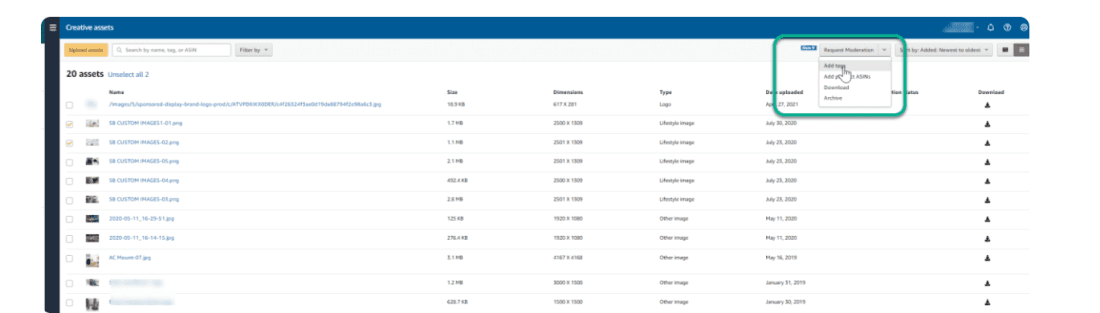
That is where Amazon Creative Assets comes in. It is a centralized creative library inside the Advertising Console where your images, videos, and logos live in one place. Instead of uploading creatives campaign by campaign, you store them once, organize them properly, and reuse them across Sponsored Ads, Stores, and A+ Content.
You manage assets, not scattered uploads. And that small shift changes how manageable scaling actually feels. This article looks at Amazon’s Creative Assets less as a feature and more as a system, focusing on how it actually works inside the Advertising Console and how sellers, vendors, and authors use it as their accounts start to grow.
Quick Guide What does Amazon Creative Assets do once things scale?
How You Upload and Organise Your Library Sets the Tone for Everything Using Creative Assets Across Amazon’s Ad Platform Types of Amazon Creative Assets Across Ad Formats Taking Creative Assets Further With the API and Multi-User Access What Separates a High-Performing Creative Asset Strategy From an Average One?
Final Takeaway: Creative Assets is only as powerful as the strategy behind them What does Amazon Creative Assets do once things scale? As long as one person is managing the account, creative uploads feel pretty manageable. Files live on someone’s desktop. Updates happen manually. Things still move. Right? Expanding campaigns really do change that.
Now there is an internal creative team building visuals. Like a performance marketer is launching campaigns, or maybe an external agency is handling Sponsored Display. A copywriter or designer is updating A+ Content. Everyone is working on the same brand, but not always from the same file. A logo gets slightly resized in one campaign.
A lifestyle image used in Sponsored Brands does not match what appears in the Store. An updated visual sits in someone’s drive while older versions continue running in live ads. There is no space for the blame game because there is just no single source of truth here. This is exactly where Amazon Creative Assets becomes more than a storage feature.
It becomes the shared home for every approved visual. Instead of creatives living in inboxes, folders, Slack threads, and external drives, they live inside the Advertising Console itself. When a creative team uploads an approved asset, everyone pulls from that same version.
When an external agency builds new campaigns, they select from the same centralized library. When updates are needed, changes happen once and are reflected wherever the asset is reused. The result is not just cleaner execution. It is alignment across teams, agencies, and placements. Less duplication. Fewer mismatched visuals across formats.
Faster launches because no one is chasing files. At scale, Creative Assets reduces creative clutter and turns collaboration into a structured process rather than a reactive one. It gives growing brands what they eventually realize they need most: a single source of truth for how the brand shows up across Amazon.
How do Amazon’s creative assets solve scattered creatives and inconsistent branding? Amazon Creative Assets helps surface messy creatives and inconsistent branding, but the benefit depends entirely on how the library is actually used.
The feature brings all images, videos, and brand elements into a single library, killing the common problem of creatives living across folders, ad accounts, and inboxes. This alone makes it easier for teams to work from the same set of vetted assets. The nuance is that Amazon’s Creative Assets does not create consistency on its own.
If assets are uploaded without clear naming, tagging, or ownership, inconsistencies still creep in. Brands that get real value from creative assets treat the library as an active system. Assets are organized intentionally and reused across campaigns rather than uploaded repeatedly.
When used this way, Amazon Creative Assets supports cleaner execution, faster updates, and a more consistent brand presence across Amazon as advertising efforts scale. How does the feature act within the Advertising console? Inside the Advertising Console, Amazon Creative Assets works as a shared home base rather than a campaign-level feature.
Amazon’s creative assets live in a central library instead of being paired to one individual campaign. This a
Original Source
This briefing is based on reporting from SellerApp Blog. Use the original post for full primary-source context.
Style
Audience