

Is that message really from Amazon? Just ask Alexa for Shopping.
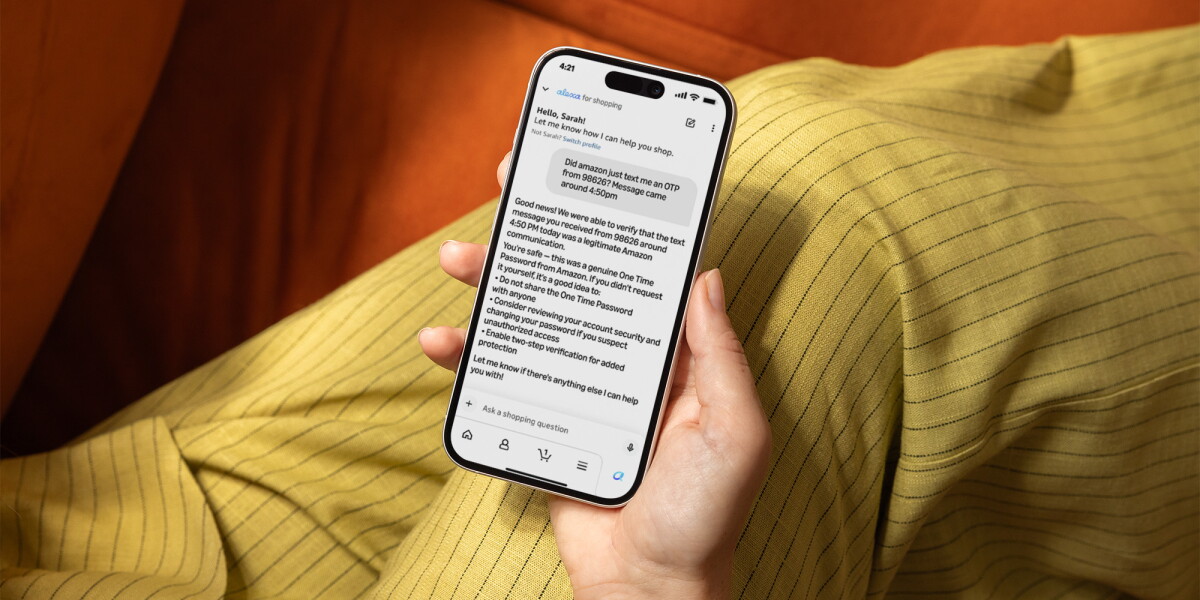
Amazon’s first-of-its-kind Alexa for Shopping feature helps protect consumers from scams.
Source Lens
Official Platform Update
Direct platform communication. Highest-value for policy, product, and operational changes.
Impact Level
medium
Use this briefing to decide whether your team needs an immediate workflow, policy, or reporting change.
Key Stat / Trigger
No single quantitative trigger surfaced in this report.
Focus on the operational implication, not just the headline.
Full Coverage
Key takeaways Amazon customers in the U. S. can now ask Alexa for Shopping to verify whether a message, email, phone call, or text came from Amazon—getting a clear answer in seconds. Only Amazon can definitively confirm whether communication originated from our own systems by drawing on a catalog of billions of messages sent by Amazon teams globally.
Every communication submitted for verification is automatically reported to Amazon, feeding intelligence that helps take down bad actors and protect more customers. Amazon is making it easier to tell the difference between real messages from the company and fake ones from scammers.
Every year, 360,000 customers contact Amazon customer service with the same question: “Is this message from Amazon real?” Now, customers can simply ask Alexa for Shopping, the world’s best, most personalized AI assistant for shopping, whether a message, email, phone call, or text they received came from Amazon.
6 tips to help you spot and avoid scams impersonating Amazon How to recognize fake emails, texts, and calls—and what to do if you receive one. “Scammers thrive when customers can't easily verify whether a message is real,” said Scott Knapp, vice president of worldwide buyer risk prevention at Amazon.
“That’s why we built a tool to put certainty directly in customers’ hands, in real time, when they need it most. It’s part of our broader commitment to educate and empower customers and protect them against scams.” Alexa for Shopping already helps customers find products, compare items, and manage their carts through natural conversation.
Now, it also helps them stay safe. By integrating communication verification into Alexa for Shopping, Amazon is bringing trust and security directly into an experience customers already use every day. The Alexa for Shopping communication verification tool adds to the list of ways customers can verify Amazon communications.
Earlier this year, Amazon launched “verify@amazon. com”—an email address available to anyone in the world, Amazon customer or not, where you can forward a suspicious message and receive a verification response confirming whether it's genuinely from Amazon. No app or Amazon account required.
Customers can also use a dedicated verification form on Amazon's customer service pages, which walks them through submitting communication details and provides an instant result. Together with Alexa for Shopping, these three options give customers multiple ways to confirm whether a message is genuine in whichever experience works best for them.
How do I verify a message with Alexa for Shopping? Using Alexa for Shopping to verify communication is straightforward: Ask: You can ask Alexa for Shopping about the message you received by providing information about where the message came from, when it arrived, and what it said.
Verify: The tool checks those details against Amazon's record of every communication it has sent, analyzing sender information, content, timing, and formatting. Get your answer: Within seconds, you receive a clear response: confirmed from Amazon, not from Amazon, or unable to verify, along with educational tips and next steps.
How to use Alexa for Shopping to compare products, check price history, auto-buy items at target prices, and more From price tracking to automated purchases to new release alerts, here's how to get the most out of Amazon's AI shopping assistant. Try asking Alexa for Shopping something like: “Did Amazon send me a text about a delivery problem yesterday?”
“Is this email about my Prime membership from Amazon real?” “I got a call about a refund from someone saying they're from Amazon. Was that real?” “Someone texted me from [phone number] about a package. Is that Amazon?” “I received a WhatsApp message saying my account is locked. Did Amazon send that?”
When you ask Alexa for Shopping to verify a message or call, the tool provides one of three clear responses: If it's from Amazon: “Yes, this message is an official Amazon communication.” The response confirms the message type, source, date, and time—plus tips to keep your account secure, like setting up passkeys and two-step verification.
If it's not from Amazon: “This message does not appear to match any official Amazon communication based on the information provided.” The response includes actionable next steps, such as checking your orders in the app, contacting Amazon directly through amazon. com/support, and avoiding clicking links or replying.
If it can't be confirmed: When the tool cannot verify with certainty, it tells you it's unable to confirm and provides guidance, including steps to resubmit with more specific information or to try “verify@amazon. com” for an alternative verification path.
Every response—even when the answer is “not from Amazon”—includes safety tips and educational guidance, such as “Amazon will never ask for your password, one-time passcode, or sensitive personal information ov
Original Source
This briefing is based on reporting from About Amazon. Use the original post for full primary-source context.
Style
Audience